A touchscreen bike computer can make route planning, turn-by-turn navigation, and ride tracking easier without requiring a phone mount. The best models combine a readable display with dependable GPS, useful sensor support, and enough battery life for your typical rides.
Our roundup compares 10 bike computers with touchscreen controls, from straightforward navigators to advanced training computers with maps, climb data, wireless connectivity, and smart alerts.
Best 10 Bike Computers with Touchscreen Picks for 2026
Best All-Rounder
iGPSPORT BSC300T Touchscreen GPS Bike Computer
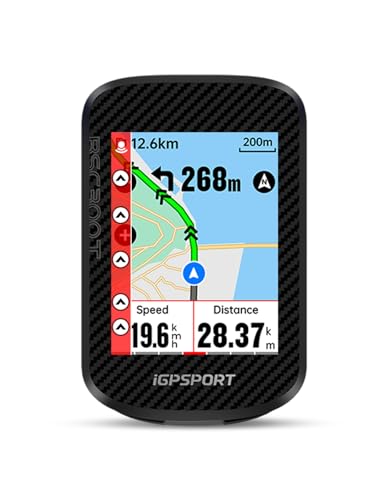
- 2.4-inch touchscreen plus six physical buttons
- Offline maps with turn prompts and off-course alerts
- 130+ metrics, ebike support, and ANT+/Bluetooth connectivity
Best For: Versatile navigation and data-focused riding
Best for Easy Navigation

- 3-inch glove- and rain-friendly touchscreen
- Preloaded road, trail, and indoor activity profiles
- Ebike routing plus LiveTrack and GroupTrack features
Best For: Simple, readable route guidance
Best for Voice Guidance
iGPSPORT BSC500 Touchscreen GPS Bike Computer

- Large 3.3-inch touchscreen with button controls
- Voice navigation and speed-based turn reminders
- Dual-band positioning with automatic route replanning
Best For: Large-screen navigation with spoken cues
Best Premium Interface

- Vivid, responsive 3-inch color touchscreen
- Customizable data screens and bike-specific route planning
- Up to 48 hours in battery-saver mode
Best For: Connected navigation with a modern interface
Best Value Touchscreen Bike Computer

- 2.4-inch color touchscreen with button controls
- Maps, turn-by-turn navigation, and GPX support
- ANT+, Bluetooth, Wi-Fi, and up to 24-hour battery
Best For: Connected riders who want navigation and broad sensor support
Best Training Touchscreen Bike Computer
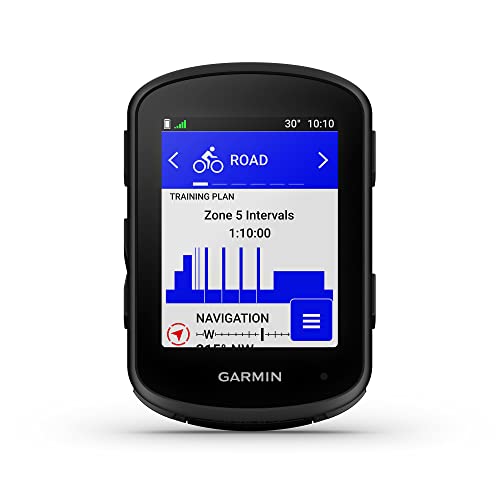
- 2.6-inch touchscreen with physical button control
- Multi-band GNSS and ClimbPro ascent planning
- Up to 26 hours demanding-use battery life
Best For: Performance-focused cyclists using training sensors
Best Smart Display Touchscreen Bike Computer

- 1.43-inch, 850-nit AMOLED touchscreen
- Phone-connected Google Maps turn-by-turn navigation
- IP69K protection with calls, alerts, and speaker
Best For: Urban and e-bike riders wanting a bright connected display
Best Value Sensor Bundle

- 2.8-inch color touchscreen with preloaded maps
- Includes heart-rate, cadence, and speed sensors
- 33-hour battery with radar support
Best For: Riders seeking a complete touchscreen GPS setup
Best Customizable Dashboard

- 2.4-inch auto-backlit color touchscreen
- Customizable metrics and 150+ data insights
- 36-hour battery with IPX7 waterproofing
Best For: Riders building a personalized connected setup
Best for Long-Distance Navigation

- Large 3.5-inch touchscreen with tactile buttons
- Offline maps and turn-by-turn navigation
- Up to 50 hours of battery life
Best For: Gravel, bikepacking, and endurance riders
Best All-Rounder – iGPSPORT BSC300T Touchscreen GPS Bike Computer
For riders comparing bike computers with touchscreen controls, the iGPSPORT BSC300T combines a 2.4-inch capacitive display with physical buttons, offline maps, off-course warnings, and broad sensor compatibility. It supports road bikes, mountain bikes, and ebikes, with up to 20 hours of battery life.
Best For: Riders who want touchscreen navigation, extensive ride data, and ebike or group-riding features in one computer.
Pros:
- Offline worldwide map downloads, route previews, turn prompts, and off-course warnings.
- Supports GPS, BeiDou, GLONASS, Galileo, and QZSS for positioning.
- Offers more than 130 ride metrics and connects with ANT+ and Bluetooth sensors.
- Includes real-time tracking and sharing through the iGPSPORT app, Strava, and Komoot.
Cons:
- The 2.4-inch screen is smaller than the displays on the Garmin alternatives.
- A USB-C cable is not included.
The BSC300T is a feature-rich choice for cyclists who want navigation and training data without giving up button controls. Its smaller display may require more attention when following maps, but the offline navigation and sensor support add considerable versatility.
Best for Easy Navigation – Garmin Edge Explore 2
The Garmin Edge Explore 2 is a straightforward option among bike computers with touchscreen navigation. Its 3-inch high-resolution display is designed for glove and rain use, while preloaded road, off-road, and indoor profiles make setup simple.
Best For: Cyclists who prioritize readable navigation, simple setup, and route guidance across different bike types.
Pros:
- Large 3-inch touchscreen remains visible in direct sunlight and works with gloves and rain.
- Preloaded maps highlight popular roads, trails, searchable points of interest, and high-traffic roads.
- Supports ebike routing and can show compatible ebike battery, assist-level, and range information.
- Works with LiveTrack, GroupTrack, incident detection, and Varia devices when paired as specified.
Cons:
- Battery life is listed at up to 16 hours.
- Heart-rate, speed, cadence, and Varia accessories are sold separately.
With its larger display and easy-to-use interface, the Edge Explore 2 is well suited to recreational riders and route explorers. It offers useful connected features, though getting the full ecosystem experience requires a compatible smartphone or additional sensors.
Best for Voice Guidance – iGPSPORT BSC500 Touchscreen GPS Bike Computer
The iGPSPORT BSC500 stands out among bike computers with touchscreen controls for its 3.3-inch display and built-in voice navigation. It accepts both touch and button input, supports route imports from services such as Strava and Komoot, and can automatically replan after a wrong turn.
Best For: Riders who want a large screen, spoken navigation cues, and automatic route correction.
Pros:
- Large 3.3-inch touchscreen can show up to 12 cycling data fields per page.
- Dual-band positioning and support for five satellite systems improve navigation capability.
- Voice alerts provide key navigation cues without relying solely on screen glances.
- Includes turn reminders, yaw replanning, climb planning, and a continue-last-ride function.
Cons:
- The supplied notes do not specify battery life.
- Some route and training features depend on the iGPSPORT app or imported route files.
The BSC500 is a compelling pick when navigation clarity matters, especially for riders who appreciate spoken prompts and automatic rerouting. Its large display and mixed touch-button controls also make it practical for monitoring several metrics at once.
Best Premium Interface – Garmin Edge Explore 3
The Garmin Edge Explore 3 is a polished choice for shoppers seeking bike computers with touchscreen displays. Its vivid, responsive 3-inch color screen, bike-specific maps, customizable data layouts, and weather-resistant design support everyday exploration in changing outdoor conditions.
Best For: Riders who want a modern touchscreen interface, customizable ride screens, and connected safety and messaging features.
Pros:
- Responsive 3-inch color touchscreen with customizable layouts and data screens.
- Preloaded bike-specific maps and route options account for factors such as ascent, speed, and bike type.
- Battery life reaches up to 16 hours in demanding use or up to 48 hours in battery-saver mode.
- Supports LiveTrack, incident detection, location sharing, and Garmin Messenger features when paired as specified.
Cons:
- Several connected safety and messaging features require a compatible smartphone and apps.
- The supplied map coverage is listed as North America.
The Edge Explore 3 is a strong fit for riders who value a refined interface and flexible route planning. Its connected features extend beyond navigation, but the most useful messaging and safety functions depend on smartphone connectivity.
Best Value Touchscreen Bike Computer – Magene C506
The Magene C506 is a strong choice among bike computers with touchscreen controls, combining a 2.4-inch color display with three physical buttons. It adds map navigation, fast Wi-Fi syncing, ANT+ and Bluetooth sensor support, and up to 24 hours of battery life.
Best For: Riders who want connected navigation, extensive sensor compatibility, and indoor-training features without a bulky computer.
Pros:
- 2.4-inch capacitive touchscreen plus three buttons for flexible control
- Turn-by-turn navigation with downloadable maps and GPX route support
- Supports up to nine device types, including power meters, trainers, radar lights, and electronic shifting
- Wi-Fi, Bluetooth, AGNSS positioning, and up to 24 hours of endurance-mode battery life
Cons:
- Some training and analysis features require the OnelapFit app or compatible equipment
- Its many data fields and settings may take time to configure
The C506 stands out for riders who want a feature-rich touchscreen computer with broad connectivity. Its combination of navigation, smart-light control, notifications, and indoor-training support makes it especially versatile for everyday riding and structured workouts.
Best Training Touchscreen Bike Computer – Garmin Edge 840
The Garmin Edge 840 is one of the more advanced bike computers with touchscreen operation, pairing a 2.6-inch display with buttons for dependable control. It focuses on navigation, adaptive training, climbing analysis, and performance insights, with up to 26 hours of battery life in demanding use.
Best For: Serious cyclists who want detailed training guidance, accurate navigation, and compatibility with power meters and heart-rate monitors.
Pros:
- Combines capacitive touchscreen and physical button controls
- Multi-band GNSS helps provide enhanced positioning accuracy
- Offers daily suggested workouts, adaptive coaching, stamina insights, and Power Guide features with compatible sensors
- ClimbPro works on every ride, and battery life reaches up to 32 hours in battery-saver mode
Cons:
- Several advanced training features require a compatible power meter and heart-rate monitor
- Its performance-focused feature set may be more than casual riders need
The Edge 840 is the strongest training-oriented option in this group. Its combination of touchscreen and button input is practical on the bike, while multi-band GNSS, course tools, and adaptive workout features support riders with ambitious training goals.
Best Smart Display Touchscreen Bike Computer – FUYU RC01
The FUYU RC01 takes a different approach to bike computers with touchscreen displays, using a compact 1.43-inch round AMOLED screen rated at 850 nits. It provides Google Maps turn-by-turn directions through the Goridenav app, riding metrics, call and message alerts, and IP69K water resistance.
Best For: Riders who prioritize a bright smart display, phone-connected navigation, alerts, and versatile mounting for bicycles, e-bikes, or motorcycles.
Pros:
- Bright 850-nit AMOLED touchscreen with 426 × 426 resolution
- Displays Google Maps turn-by-turn navigation, speed, distance, altitude, and other ride metrics
- Includes call and message alerts, a built-in speaker, LED warning light, and customizable wallpapers
- IP69K protection and included dual mounts support varied riding conditions and vehicles
Cons:
- Navigation requires a phone connection and does not support offline maps
- Up to 10 hours of continuous navigation is shorter than the battery life of the other listed options
- The 1.43-inch display provides less viewing area for maps and data
The RC01 is best viewed as a compact connected riding display rather than a standalone training computer. Its bright AMOLED panel, smart alerts, and rugged waterproof rating make it appealing for urban, e-bike, and mixed-vehicle use, provided a phone connection is available for navigation.
Best Value Sensor Bundle – Bryton Rider 650
If you want one of the more complete bike computers with touchscreen, the Bryton Rider 650 combines a 2.8-inch color display with a full set of cycling sensors. Its preloaded maps, long battery life, and radar compatibility make it practical for training, commuting, and navigation.
Best For: Riders who want a touchscreen GPS computer with heart-rate, cadence, and speed sensors included.
Pros:
- Includes smart heart-rate, cadence, and speed sensors.
- Preloaded color maps provide turn-by-turn guidance, street names, and points of interest.
- Offers up to 33 hours of battery life and supports bike radar.
- Syncs with Strava, TrainingPeaks, and Komoot through the Bryton Active app.
Cons:
- The 2.8-inch screen is smaller than the displays on some larger navigation-focused models.
- The included sensor bundle may be unnecessary for riders who already own compatible sensors.
The Rider 650 stands out when value means more than screen size. It delivers a ready-to-ride performance setup, useful mapping, and extended battery life without requiring several separate accessories.
Best Customizable Dashboard – COOSPO CS600
The COOSPO CS600 is a practical choice among bike computers with touchscreen for riders who want flexible data displays and dependable weather protection. It pairs a 2.4-inch color touchscreen with route navigation, wireless connectivity, and a 36-hour battery.
Best For: Cyclists who want customizable ride metrics, app syncing, and a waterproof touchscreen computer.
Pros:
- Auto-backlit color touchscreen adapts to surrounding light.
- Supports route uploads, breadcrumb navigation, and GPS/GLONASS tracking.
- Provides up to 36 hours of battery life with USB-C charging.
- IPX7 waterproofing and compatibility with radar, lights, e-bikes, trainers, and electronic shifting.
Cons:
- Additional cadence, heart-rate, and power sensors are sold separately.
- The 2.4-inch display is more compact than the screens on larger Bryton models.
The CS600 is a strong fit for riders who prefer to configure their own setup. Its broad ecosystem support and personalized dashboards make it useful for both everyday rides and structured training.
Best for Long-Distance Navigation – Bryton Rider S810
For long rides and remote routes, the Bryton Rider S810 is one of the most capable bike computers with touchscreen in this group. Its large 3.5-inch display, offline maps, tactile buttons, and 50-hour battery are designed for navigation when phone service or frequent charging may not be available.
Best For: Bikepackers, gravel riders, and endurance cyclists planning extended or off-grid adventures.
Pros:
- Large 3.5-inch color touchscreen with an adaptive light sensor.
- Offline maps, turn-by-turn guidance, and on-device rerouting work without cell service.
- Provides up to 50 hours of battery life for long-distance use.
- Supports heart-rate, speed, cadence, power, radar, and smart-trainer accessories.
Cons:
- This device-only version does not include the sensor bundle.
- The larger feature set may be more than casual riders need.
The S810 prioritizes visibility, endurance, and dependable navigation. Physical buttons complement the touchscreen in rain or on rough terrain, while broad sensor support leaves room to expand a performance-focused setup.
How We Picked the Best Bike Computers with Touchscreen
We focused on the features that matter most during real rides: screen readability, touch responsiveness, GPS accuracy, mapping and rerouting, battery endurance, weather resistance, wireless connectivity, and ease of setup. We also considered how well each computer fits its intended rider, since a recreational navigator has different needs from a cyclist training with power, heart-rate, cadence, or radar sensors.
Models with broader compatibility for Bluetooth and ANT+ accessories earned attention, as did computers offering offline maps, turn-by-turn directions, route warnings, and practical companion apps. A touchscreen is useful, but it should support the riding experience rather than replace reliable physical controls or clear data screens.
Quick Comparison
- Best for simple navigation: Look for a clear map interface, intuitive route planning, and dependable rerouting.
- Best for training: Prioritize structured workouts, customizable data fields, sensor support, and training metrics.
- Best for long rides: Choose a large battery, offline maps, strong weather resistance, and readable display settings.
- Best for connected riding: Consider Bluetooth, ANT+, Wi-Fi, phone notifications, cycling radar, and electronic shifting support.
- Best value: Focus on core GPS navigation and sensor compatibility instead of paying for advanced training analytics you will not use.
Key Buying Factors for Bike Computers with Touchscreen
Display and Touch Controls
Check screen size, brightness, contrast, and whether the display remains legible in direct sunlight. Capacitive touchscreens are convenient for menus and maps, but gloves, rain, and cold conditions can affect responsiveness. Physical buttons or an easy-to-reach control layout are helpful when you need to interact with the computer while riding.
Navigation and Mapping
Turn-by-turn directions, rerouting, offline maps, breadcrumb trails, and off-course alerts are not identical features. If you regularly ride outside cellular coverage, offline mapping is especially important. Confirm whether maps cover your region and whether route creation requires a phone, a subscription, or a separate app.
Battery and Durability
Compare claimed battery life with your usual ride length, then allow extra capacity for navigation, bright screens, sensors, and phone connectivity. Look for water resistance suitable for your conditions and a secure mount that can withstand vibration on rough roads or trails.
Sensor and Device Compatibility
Bluetooth and ANT+ support can connect heart-rate monitors, cadence and speed sensors, power meters, smart trainers, radar, and electronic shifting systems. Compatibility matters more than the number of available data fields if you already own cycling accessories.
Who Should Buy Which Bike Computers with Touchscreen?
Casual riders and commuters should choose an easy-to-use model with reliable GPS, a readable screen, basic navigation, and strong weather protection. Touring and adventure cyclists will benefit from offline maps, long battery life, rerouting, and clear off-course warnings. Performance-focused cyclists should prioritize advanced training features, extensive sensor support, customizable screens, and structured workout compatibility. E-bike riders may want a computer that integrates with their bike system while also providing navigation and ride alerts.
Before buying, verify mount compatibility, map coverage, charging requirements, and the return policy. The best touchscreen bike computer is the one whose navigation, battery, controls, and connected features match how—and how often—you ride.